

Google Drive offboarding: keep the files and close the access when someone leaves

Most teams treat offboarding as locking an account, but the account is the easy part. Google Drive offboarding is where things go wrong: the files the person owns, the folders they shared with clients and the edit rights they still hold on the team's documents. This guide lays out a checklist in three stages, a week before, on the last day and after the person leaves, and shows how to handle the Drive side without admin rights.
In this guide
- Why Drive is the hardest part
- What Google Workspace admins can do
- A week before: take inventory
- The last day: transfer ownership
- After they leave: remove leftover access
- Shared folders and shared drives
- Freelancers and contractors
- Common mistakes
- Who should own the process
- One-page checklist
- Frequently asked questions
Why Drive is the hardest part of Google Drive offboarding
Email can be forwarded and calendars handed over in minutes. Drive is different: someone who worked two years can own thousands of files spread across many projects. Many of those are team documents that happen to sit under that person's name.
- Files they own: delete the account before transferring and the team loses those files
- Access they hold: personal addresses they were invited with can still open team documents
- Links they shared: clients and partners can still open project folders after they leave
A good Google Drive offboarding process covers all three groups, not just the account itself.
What Google Workspace admins can do for Google Drive offboarding
The Admin console has a few important tools. An admin can suspend the account to stop sign-in right away, and can move all of the person's Drive files to someone else, as described in Google's guide to transferring Drive files to a new owner.
That transfer moves everything at once, but it does not let you choose which files go to whom. Everything lands with one person, usually the direct manager, who then has to sort it out. It also does nothing about access the departing person holds on other people's files, or links they opened to clients.
In small companies, the person running offboarding is often a team lead or office manager without admin rights. They need a way to handle the Drive side without waiting for IT.
A week before: take inventory and assign files
This stage decides how well the whole Google Drive offboarding goes. While the person is still working, they know which files matter and who should get them.
- Export a list of files the person owns, with folders and sharing status
- Sit with them and mark who receives each group of files, by project or by client
- Flag personal files unrelated to work so they can deal with them
- List the clients and partners they currently share files with
This list becomes the handover record. The person leaving can also find their own files with the owner:me search in Drive, and anything outside a folder with is:unorganized owner:me, as explained in the guide to finding Google Drive orphaned files.
The last day: transfer ownership
In any Google Drive offboarding, the last working day is the time to transfer ownership, while the person's account is still active. Each group of files goes to the recipient agreed the week before.
- Transfer in bulk by project folder, keeping the folder structure intact
- For important files someone else currently owns, send a request so ownership moves to the right person
- Keep a log: which file, from whom, to whom and when
In Google Workspace, ownership can only move between people in the same organization. There is no automatic undo for an ownership transfer: to reverse it, the new owner has to transfer the file back. Check the list carefully before you confirm.
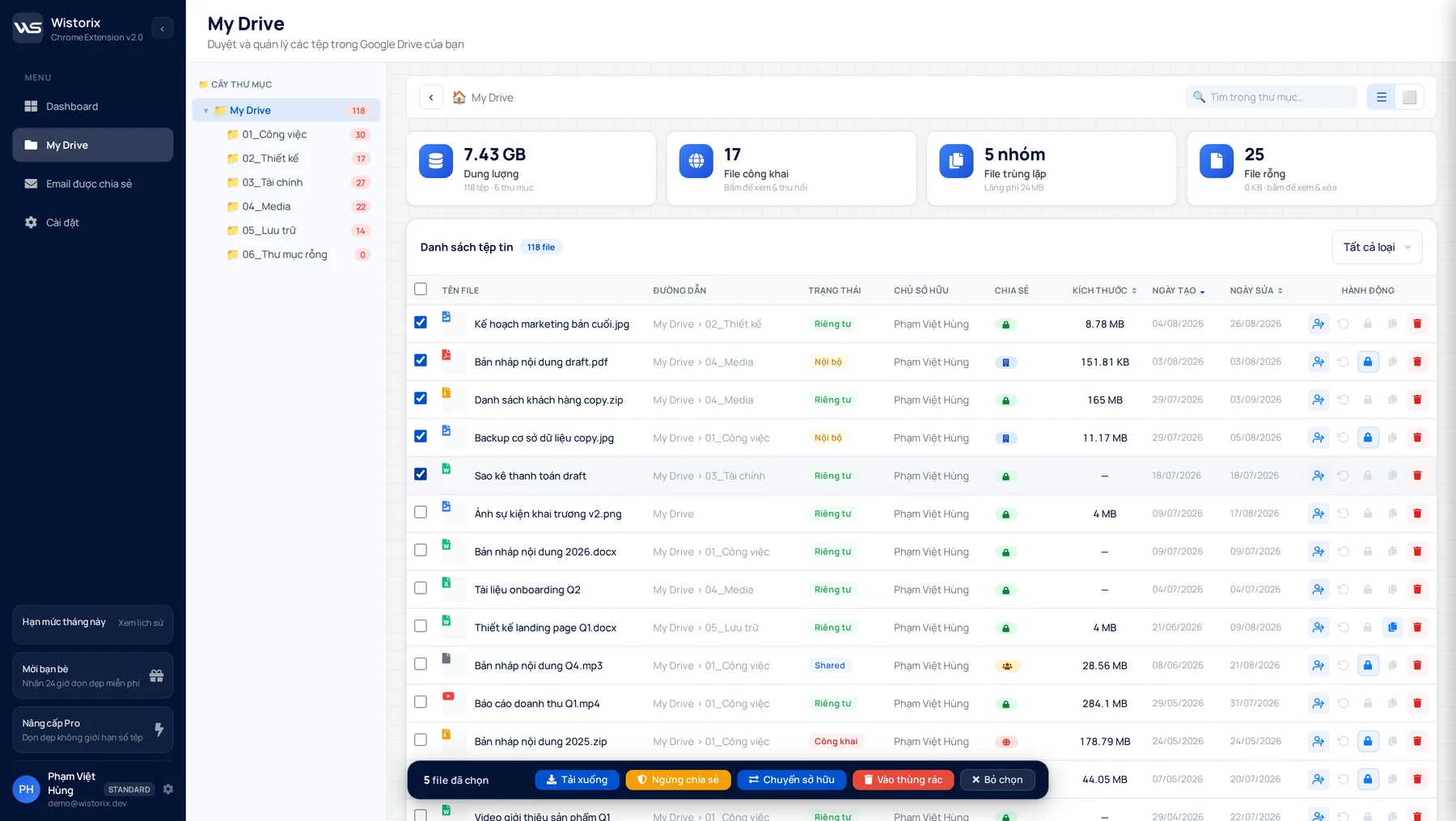
The ownership transfer page shows how Wistorix moves many files in one action while keeping folders in place.
After they leave: remove leftover access
Suspending the company account does not remove access granted to the personal Gmail address the person may have used. The last stage of Google Drive offboarding is a review of whatever access is left.
- Remove the person's personal addresses from every team file
- Close public links they opened for clients once the project is done
- Review access for the clients and freelancers they managed
Google Drive does not notify people when you remove their access, and you can share again anytime if you remove someone by mistake. The guide on how to revoke access to Google Drive files in bulk covers the review person by person.
Shared folders and shared drives
Shared folders are where access lasts longest. If the person owns or manages a folder, every file inside inherits its sharing. Review folders before single files, since fixing a parent folder applies to everything below it.
In a shared drive, files belong to the organization, so they stay when an account is deleted. The person can still be a member or manager of that shared drive, though. Remove their membership and make sure at least one other active manager remains.
- Folders the person created: transfer ownership of the folder and the files inside
- Folders the person was invited to: remove them at folder level
- Shared drives: remove their membership and add a replacement manager
Google Drive offboarding for freelancers and contractors
Contractors often work from a personal Gmail address, which changes the picture. Files they create inside your shared folders belong to them, not to your company, and a Workspace account cannot take ownership of a file from a personal account. Plan for this before the contract ends rather than after.
- Ask the contractor to hand over final versions inside your folders before their last day
- For files they still own, make a copy: the copy belongs to you and stays when they leave
- Remove their address from project folders and close any public links they used
- Keep the handover record with the same T-7 and T+30 steps as for employees
The simplest prevention is to have contractors create files from templates you own, or work in a shared drive where files belong to the organization from the start. That turns contractor Google Drive offboarding into a single access review instead of a hunt for files.
Common Google Drive offboarding mistakes
Most problems after someone leaves come from small Google Drive offboarding steps that were skipped, not from big errors.
- Deleting the account on the last day: files that were not transferred are deleted with it
- Sending everything to the manager: the recipient cannot tell which file belongs to which project
- Only suspending the company account: the personal Gmail address still opens documents
- Forgetting client links: project folders stay public with nobody watching them
All four are avoidable if you start the inventory a week early and scan again a month later. That is why the checklist below has stages at T-7 and T+30.
Who should own the process
In larger companies, IT handles accounts and department heads handle files. In small companies one person often does both. Either way, split the work into three roles.
- Admin: suspends and later deletes the account and frees the license
- Team lead: decides who receives which files and signs off the handover record
- The person leaving: points out important files and deals with personal files before the last day
With clear roles, Google Drive offboarding takes a few hours instead of dragging on for weeks.
One-page Google Drive offboarding checklist
- T-7: export the list of files the person owns and agree a recipient for each group
- T-7: list the clients and partners they share files with
- T-1: transfer ownership in bulk following the list and keep the log
- T-1: request ownership of important files that still sit with someone else
- T0: the admin suspends the account
- T+1: remove the person's personal addresses and close links that are no longer needed
- T+30: scan again to confirm nothing still sits under the old account, then delete it
Scanning a Drive with Wistorix is free and unlimited, and it only reads file metadata such as names, owners and sharing settings, never file contents.
Frequently asked questions
What happens to someone's files when their account is deleted?
Files they own and did not transfer are deleted with the account. In Google Workspace an admin can restore a deleted user for 20 days, but it is much safer to transfer ownership or run the admin transfer before deleting.
Which steps can I do without admin rights?
Taking inventory, transferring ownership while the person can still sign in and removing access on files you own. Suspending and deleting the account still need an admin.
Can files be transferred to someone's personal Gmail?
No. In Google Workspace, ownership can only move to people in the same organization.
How long should a suspended account be kept?
It depends on company policy. Many teams keep it suspended for about a month, scan again to confirm nothing important is left under that account, and only then delete it.



sharing publicly?