

Google Drive sharing audit: why a short monthly check beats one big cleanup
The hard part of a tidy Google Drive is not the first cleanup, it is staying clean afterwards. A regular sharing audit is a short review on a fixed schedule that catches new public links, new outside access and new large files while the list is still short. This guide explains why that works better than one big cleanup, how often to run it, and what to look at each time so it takes minutes, not an afternoon.
In this guide
- New data never stops
- Risk comes from new files
- Small regular checks cost less
- How often to run it
- Run the audit with Wistorix
- A sharing audit for teams
- Reminders and automation
- Frequently asked questions
Reason 1: new data never stops
Every week you create documents, upload files and share links. After about three months, the number of items that need a look is usually back where it was before your last cleanup. Drive does not get messy because you do something wrong. It gets messy because you are working.
Think about a normal week on a project. A few new documents for a client, some PDF exports, a folder of photos for a partner and a couple of quick switches to anyone with the link. None of it is a mistake, but after a few months it adds up to a Drive full of things nobody remembers.
The three things that build up fastest
- Public links created to send something quickly and never closed
- Copies, exports and duplicates left after each round of edits
- Access for people who finished their part of the work but were never removed
Each one is small when you look at a single file, and large when you look at the whole Drive. A regular sharing audit catches them while the list is still short.
Reason 2: risk comes from new files, not old ones
You already dealt with the old files. The real exposure is the link you created last week and have already forgotten. Checking on a schedule catches these while they are fresh and you still remember who the file was for and why.
A public link found after one week is easy to decide on, because you know whether it is still needed. One found after two years is much harder, since nobody remembers what it was for. Either way, sharing can be changed and closing a link never deletes the file.
What to look at in each sharing audit
- Files that switched to anyone with the link since the last review
- Outside addresses that gained access recently
- New large files, especially videos and archives
- Whether your security score went up or down, and which group pulled it down
These four questions are enough for one short session. If you need to close many public links at once, the guide to finding publicly shared files in Google Drive walks through it step by step.
Reason 3: small regular checks cost less than a big cleanup
The first sharing audit always has the most work. After that, each review only covers a handful of changed files and takes a few minutes. Twelve monthly reviews usually take less time in total than one large cleanup after a year of neglect.
The reason is memory. When a file is new, you decide to keep or remove it in seconds because you remember the context. When it is old, every decision means opening the file, reading it again and asking colleagues. Same number of files, very different effort.
A big cleanup is also easy to postpone because it looks heavy. A fifteen-minute task once a month is easy to start, and starting regularly is what keeps a Drive tidy over time.
How often to run a sharing audit
A schedule that fits most people:
- Individuals: once a month
- Small teams: every two weeks
- Businesses: every week, with automatic alerts once available
- Right after each project ends
- Right after someone leaves the team
The schedule does not need to be exact to the day. What matters is that it repeats and is tied to something you already do, such as month-end reporting or the first team meeting of the week.
Monthly check versus quarterly audit
A monthly sharing audit looks only at what changed since last time: new links, new outside access and new large files. Once a quarter it is worth going wider and checking your account, connected apps, file ownership and old data as well. The ten-point Google Drive security audit covers that deeper review, and most of it gets faster once the monthly checks are in place.
Keeping the two apart stops the monthly check from growing into a big job. If something in the monthly review looks serious, such as a customer list set to public, fix it right away rather than waiting for the quarter.
Run the sharing audit with Wistorix
Each Wistorix scan gives you a security score out of 100 and a list of issues split into five risk groups. Every group has a fix button on the same screen, so you go straight from finding a problem to dealing with it without opening files one by one.
Wistorix never deletes anything on its own: every action is your choice, and files you delete stay in the Google Drive Trash for 30 days so you can restore them.
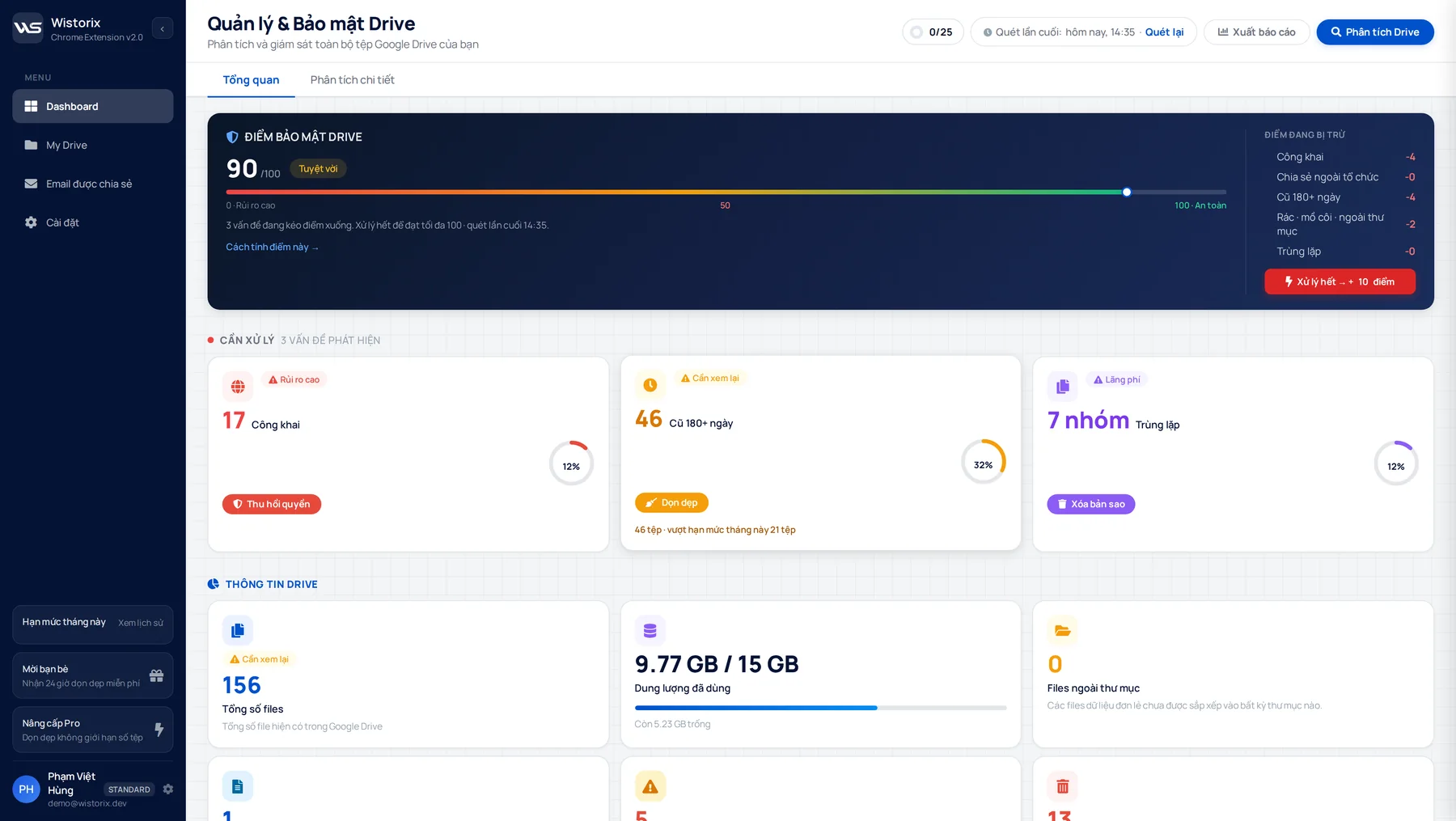
Comparing scores between reviews shows whether your Drive is getting better or worse. A sudden drop usually means a burst of sharing that deserves a closer look. The sharing risk scan page explains each group.
What it costs to check often
Scanning with Wistorix is free with no limit on how often you run it. The free plan covers changes to 25 files a month, which is usually enough for regular reviews once the first cleanup is done. Wistorix reads metadata such as names, sizes and sharing settings, never file contents, and you can remove its access anytime from the Security section of your Google Account.
A sharing audit for teams
For one person, scanning and fixing your own Drive is enough. In a team, files are spread across many people's Drives, so the schedule needs clear owners. Otherwise everyone assumes someone else did it.
- Each teammate scans their own Drive on the shared schedule
- The team lead reviews shared project folders and the partners who have access
- One person keeps a simple log of who reviewed and when
Agree on the same short checklist for everyone, so results can be compared across the team and nobody invents their own version of the review.
A fifteen-minute slot after the first meeting of the month is enough for a team under ten people. Everyone opens Wistorix on their own Drive, handles their part and shares their score. Over time the scores go up and each review gets shorter.
Signs you should review early
A fixed schedule is the minimum, not the limit. Run an extra sharing audit when the risk suddenly goes up.
- You just sent many documents to a new client or partner
- A campaign or event with many outside people just ended
- Someone on the team left or moved to another department
- You received an access request from an address you do not know
Reminders and automation
Wistorix is working on scheduled scans with alerts for new public files (coming soon), so you will not need to remember. Once available, the review will run in the background and only notify you when something needs attention.
Until then, the simplest option is a repeating event in Google Calendar. Create a fifteen-minute event each month and paste the four questions from above into the description. After a few months, the sharing audit becomes as routine as checking your inbox.
A side benefit: storage stays under control
Regular reviews are not only about security. Each time, you also see new large files and fresh duplicates. Dealing with them while they are few keeps your Drive from filling up right when you need to send something urgent. The free 15 GB is shared by Drive, Gmail and Photos, as Google explains on its page about managing storage in Drive, Gmail and Photos.
Frequently asked questions
How often is a sharing audit enough?
Once a month for individuals. Teams that share a lot with clients should review every two weeks, plus an extra check when a project ends or someone leaves.
Does scanning change my files?
No. A scan only reads names, sizes and sharing settings to build the list. Changes happen only when you select files and click an action.
Is the next review faster than the first?
The scan time depends on how many files you have. The work after the scan is much faster, because the first review clears the backlog and later ones only cover new files.
If I closed every public link, do I still need regular reviews?
Yes. New public links appear every time you or a colleague shares a file in a hurry. Reviewing on a schedule catches them while they are new and easy to handle.



sharing publicly?