

Wistorix for small business: manage Google Drive without an IT person

Wistorix for small business teams is meant for companies of a few people up to a few dozen, who use Google Drive every day but have nobody dedicated to IT. You see which files are open to outsiders and who still has access to company documents, you keep files when an employee leaves, and you get storage back before you have to buy more. Wistorix is a Chrome extension, scanning is free, and it reads only file metadata, never file contents.
In this guide
- What a small company's Drive usually looks like
- Five questions Wistorix answers
- Which account to start with
- A 15-minute monthly review
- Personal Gmail or Google Workspace
- What is free and how your data is handled
- Frequently asked questions
What a small business Drive usually looks like
In a small company, Google Drive is rarely designed from the start. The owner creates a few folders, the accountant adds a few more, new staff use personal Gmail accounts to receive files, and each year Drive grows by another layer. Nobody did anything wrong, but after two or three years the same picture tends to appear.
- Contracts, quotes and accounting records spread across the Drives of three or four different people
- Many files shared through public links with clients, print shops and seasonal staff
- People who have left still have edit access to shared folders
- The Drive of whoever holds the most files is full, usually the accountant or the person who handles photos and video
Large companies have administrators and admin tools to handle all this. A small business does not, so Wistorix is designed so the owner or an office employee can do the work themselves. No server setup and no admin rights are needed.
None of these problems is urgent on any single day, which is exactly why they pile up. The fix is not a big project but a clear view of the whole Drive, followed by a few minutes of cleanup at regular intervals.
Five questions Wistorix answers for a small business
Instead of listing dozens of features, it helps to think in questions. Here are five questions small business owners often ask about Drive, and how Wistorix answers each one.
1. Which company files are open to anyone with the link?
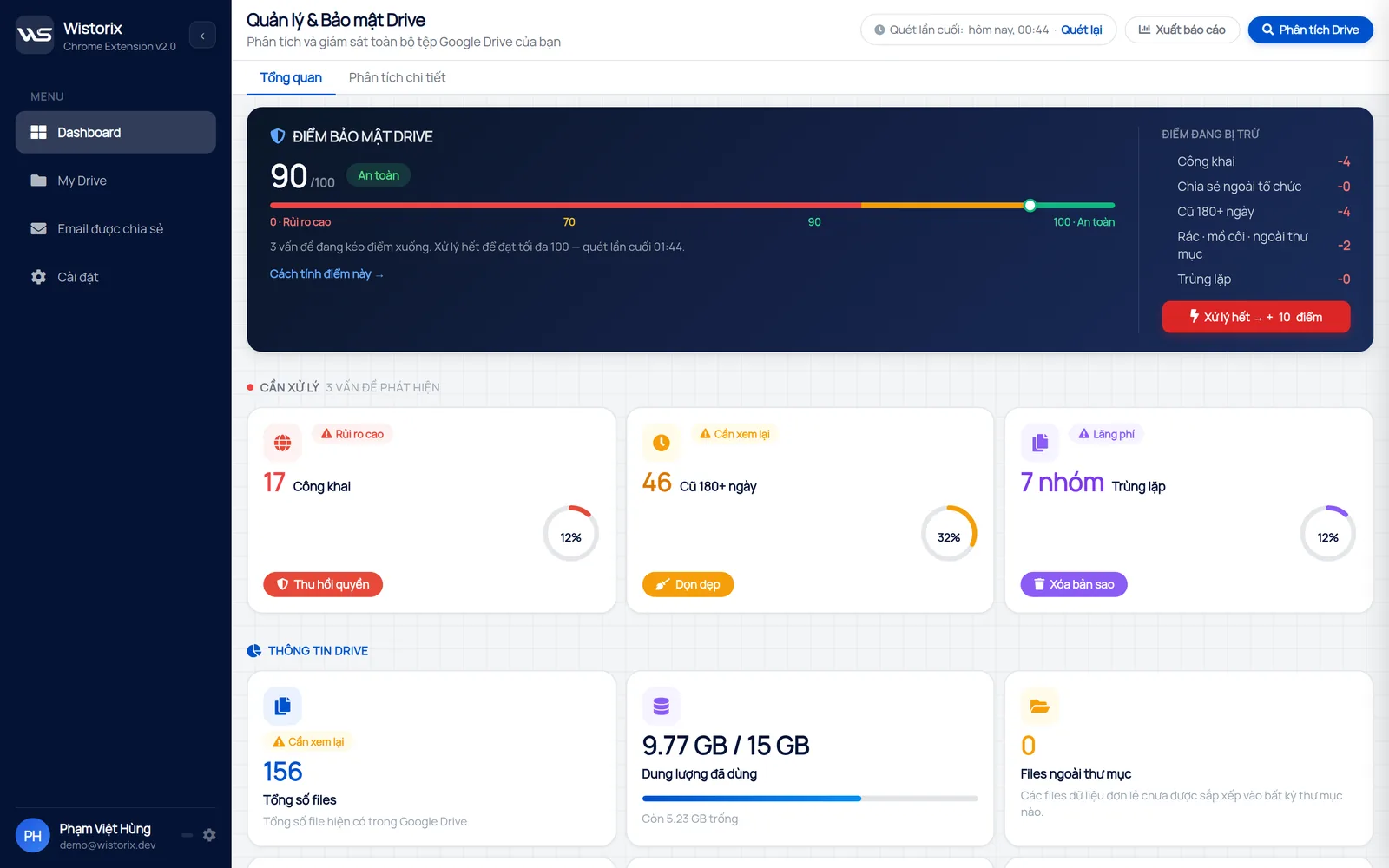
After a scan, the dashboard shows a Public card with the number of files open through a link. Open the list, check the file names, and close the links on contracts, payroll and customer data first. Every action has a confirmation box, so nothing runs until you agree.
2. Who outside the company has access to our documents?
The shared emails page lists every address with access and marks the ones outside your organization. Former clients, seasonal staff, service providers you no longer work with: you can remove each of them from every file with one button. If you remove someone by mistake, you can share the file again anytime.
3. Which files does an employee who is leaving still hold?
Scan Drive with the account of the person who is leaving to see the files they own, then transfer ownership in bulk to the person taking over before their last day. This is the step small companies forget most often, and it is much harder to sort out once the account has been deleted. The ownership transfer page shows how the bulk transfer works.
4. Why is Drive full when nobody saved anything new?
Wistorix finds duplicate files, empty files and files nobody has opened in a long time. For a small business, product photos and promo videos saved in several copies are often the biggest use of space. Anything you remove goes to the Google Drive Trash first, where you can restore it for 30 days.
5. Is the company Drive safer than last month?
The security score from 0 to 100 gives you one number to compare from scan to scan. When you finish a group, the score goes up by the points that group was costing you. You do not need to read a technical report to know whether things are getting better or worse.
Wistorix for small business: which account to start with
Wistorix scans the Drive of the account that is signed in, so the order of scans decides how fast you see useful results. For a small business, start with the person who holds the most documents.
- The account of the accountant, or whoever keeps contracts and records
- The owner's account
- The account of whoever handles photos and video, which usually uses the most storage
- Everyone else, each person scanning their own Drive
This way you get useful results from the very first account, instead of waiting for the whole company to install the extension. The first scan of each account usually takes from one to a few minutes.
Agree on a short deadline for the remaining accounts, for example two weeks. Small teams move fast once the first results show what is at stake, and the owner can see progress in each person's score.
A 15-minute monthly review for your small business
A company without IT staff usually only looks at Drive when something goes wrong: a link gets out, Drive fills up, someone leaves with documents. A fixed schedule turns that into a small habit instead of a big emergency.
The first round always has the most work. From the second month on, a small business only needs a short review at the start of each month, tied to closing the books so there is nothing extra to remember.
- Minutes 1 to 3: scan Drive again and compare the security score with last month
- Minutes 4 to 8: close new public links on sensitive files
- Minutes 9 to 12: check new outside addresses and remove people whose work is done
- Minutes 13 to 15: export a report to keep on file
When someone leaves, add a separate round for their account before their last day. The list of what to review regularly is in the guide to a Google Drive security audit.
Personal Gmail or Google Workspace for a small business
This question shapes most of how a small business uses Wistorix, because Google handles ownership and sharing differently on the two kinds of account. A company without IT should still know the difference before moving files between employees.
Many small companies still use personal Gmail for work. Wistorix works with both personal Gmail and Google Workspace, with no admin rights needed. The difference lies in what Google allows.
- Personal Gmail: transferring ownership requires the recipient to accept an invitation, and every account counts as outside the organization for the others
- Google Workspace: ownership transfers within the same company take effect right away, and shared files are best kept in shared drives
Google explains both cases on its page about how to make someone else the owner of a file. If more than five people work on the same documents, moving to Google Workspace is usually worth considering, because access and handovers become much simpler. How to reorganize Drive when you switch is covered in Google Drive for business.
Whichever account type you use, write down who owns the key folders. When the owner of a folder is a person rather than a role, a single resignation can leave the team without control over its own files.
What is free and how your data is handled
With Wistorix, every reading and viewing step is free: scanning Drive, checking the security score, opening every list and exporting a report. That is enough to find the most sensitive links on the very first run.
As for your data, Wistorix reads only file metadata such as name, size, owner and sharing settings. File contents are never downloaded. Every action runs only after you confirm, deleted files go to the Google Drive Trash and can be restored for 30 days, and you can remove the access you gave Wistorix in your Google Account anytime.
In short, Wistorix gives a small business one picture of its whole Drive sorted by risk, instead of opening files one by one. Start with the account that holds the most documents, handle public files and outside access first, then keep the 15-minute monthly review.
The first session is usually the longest, because it covers years of sharing at once. After that, most companies find that the monthly review stays short and the score stays steady.
Frequently asked questions
Can a company with no IT person use Wistorix?
Yes. Wistorix installs like any Chrome extension and you sign in with your Google account, with no server setup or admin rights.
Can a company that uses personal Gmail accounts scan its files?
Yes. Wistorix works with personal Gmail and Google Workspace. Each account scans separately and has its own results.
Does Wistorix read the company's contracts or accounting records?
No. Wistorix reads only the file name, size, owner, sharing settings and dates. File contents are never downloaded.
Is Wistorix free to use?
Scanning, the security score and report export are always free. Every change you make runs only after you confirm it.



sharing publicly?