

What is Wistorix: a Chrome extension to manage Google Drive, with free scans

What is Wistorix? It is a Chrome extension that helps you review and optimize Google Drive: it finds duplicate, empty and old files, spots files that are public or shared outside your organization, revokes access and transfers ownership in bulk. Scanning your Drive is always free, and you can run a scan as often as you like. This post gives a short answer to what the extension does, what data it reads and who it is built for.
In this guide
- What is Wistorix, in one minute
- What is Wistorix in practice: three feature groups
- Is Wistorix free? What the free scan includes
- What Wistorix reads in your Drive
- Who Wistorix is for
- Compared with doing it by hand
- What is Wistorix, and what it is not
- Get started in 5 minutes
- Frequently asked questions
What is Wistorix, in one minute
Google Drive is very good at storing files, but it does not give you the big picture. It will not tell you which files are duplicates, which links have been public for three years or which former client can still edit a folder. To find out, you have to open every folder and every file yourself.
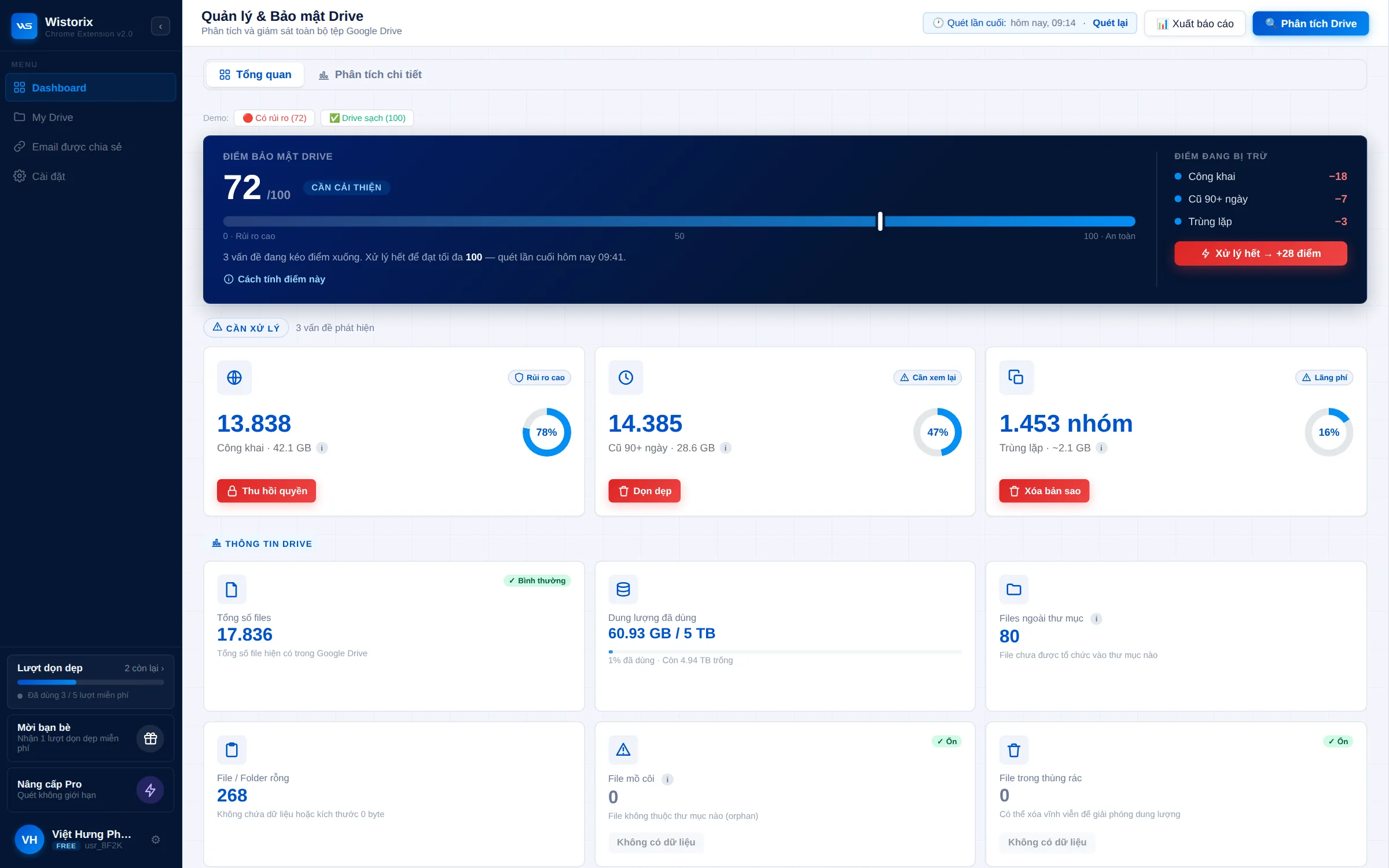
So, what is Wistorix in short? It is a management layer that sits on top of Drive. You add the extension to Chrome, sign in with your Google account and click Scan. A few minutes later, the Dashboard shows a security score from 0 to 100, your storage broken down by file group and a list of things to review.
Wistorix does not replace Google Drive and does not move your files anywhere. Your files stay in Drive exactly where they are. Wistorix only reads file metadata to point out what needs a second look, then acts when you click to confirm.
What is Wistorix in practice: three feature groups
The most concrete answer to "what is Wistorix" comes from the three kinds of work it does for you. Each group has its own feature page on the website and a set of small tools that go with it, so you can start from the job you care about most.
Storage optimization
Wistorix groups duplicate files by checksum, so it also catches copies that were renamed along the way. It lists empty files of 0 bytes, orphaned files that lost their parent folder and old files nobody has opened for a long time. Each group shows the number of files and the space they use, so you can handle the largest group first.
Security and sharing
Wistorix lists files set to anyone with the link, outside email addresses that still have access and editor rights that are no longer needed. You can revoke one address from every file in a single action, or turn off public links in bulk. Access is grouped by email, so you work from a list of people instead of a list of files.
Ownership and handover
When someone leaves or a project closes, Wistorix transfers ownership of many files to the person taking over, keeps the folder structure in place and records a log. For files someone else holds, you can send a request asking them to transfer ownership to you.
Each of the Wistorix features above also has its own page in the collection of free Google Drive tools, from finding duplicate photos to requesting ownership of a file.
Is Wistorix free? What the free scan includes
The second question after "what is Wistorix" is usually whether it costs anything. Scanning and viewing results are free. You can scan as many times as you need and see the full Dashboard, the security score and every list.
- A free Drive scan, as often as you want to run one
- The security score from 0 to 100 and every risk group behind it
- Duplicate, empty, old and orphaned files, each with the space they use
- Public links and outside addresses that can still open your files
- A report you can export and keep
Acting on files, such as moving them to the Trash, revoking access or transferring ownership, always waits for your confirmation. For many personal users, the first free Drive scan is enough to see what needs attention and which job to do first.
What Wistorix reads in your Drive
This is the most important part of the answer, because any extension connected to Drive touches your data. Wistorix reads only file metadata through the Google Drive API: name, size, owner, sharing settings and dates.
- It never reads or downloads file contents
- It never deletes a file or changes a permission on its own. Every action runs only after you confirm
- Deleted files go to the Google Drive Trash, where you can restore them for 30 days
- You can remove its access anytime from the Security section of your Google Account
Third-party apps that use Google data must follow the Google API Services User Data Policy. Wistorix sticks to reading just enough information to manage your Drive, and no more.
Who Wistorix is for
Wistorix is built for people who use Drive every day on a computer. It needs no admin rights and works with both personal Gmail accounts and Google Workspace accounts.
- Freelancers: share files with many clients each year and need to close access when a project ends
- Agencies: manage folders for many clients and many contractors at the same time
- In-house teams: hand over files when someone leaves or moves to another department
- Small businesses: use Google Workspace without a dedicated IT admin
If you run an agency, the post on Google Drive for agencies describes a review routine that follows the life of each client project.
Compared with doing it by hand in Drive
You can do part of this work by hand. The difference is time, and how much you miss once a Drive has been in use for a few years.
| Task | By hand in Drive | With Wistorix |
|---|---|---|
| Find duplicate files | No built-in feature, you compare by eye | Grouped by checksum, renamed copies included |
| Find public files | Open each file and check its sharing | One list after a scan |
| Remove a former client | Remove them from every file one by one | Revoke once across every file |
| Hand over files when someone leaves | Transfer file by file or folder by folder | Bulk transfer, with a log |
For a small Drive with a few hundred files, the manual route is fine. Once you have several years of projects, clients and shared folders, the time spent searching is usually far larger than the time spent deciding.
What is Wistorix, and what it is not
Knowing what the extension does also means knowing what it does not do, so your expectations are right from the start.
- Not a storage service: Wistorix keeps no copies of your files
- Not backup software: if you want a backup copy, use a dedicated backup tool
- Not an auto-delete tool: every action waits for you to click
- Not a Google Photos or Gmail cleaner, even though all three share the same storage quota
In one sentence, what is Wistorix? A tool to see and decide, while Google Drive stays the place where your files live. Seeing it this way helps you use it where it fits best: regular reviews, handling files by group and clean handovers when your team changes.
Get started with Wistorix in 5 minutes
Once you know what the extension does, the fastest way to judge it is to run one scan on your own Drive. The whole process usually takes less than 5 minutes for a personal account.
- Open the Wistorix home page in Chrome on your computer and click to install it for free
- Sign in with your Google account, read the consent screen carefully, then grant access
- Click Scan and wait for the Dashboard to show the results
- Look at the security score first, then at the file group using the most storage
A walkthrough of every screen, from the first scan to reading the security score, is in the guide on how to use Wistorix. Keep it open next to the Dashboard during your first session.
A tip for your first scan: do not try to fix everything in one sitting. Close public links on sensitive files first, then move on to duplicates and old files. This order lowers your exposure fastest without taking much of your time.
So, what is Wistorix? A Chrome extension that shows you your whole Drive, frees up storage, closes access nobody needs and makes file handovers clean. Scanning is free, and every decision stays with you.
Frequently asked questions
Is Wistorix a Google app?
No. Wistorix is an independent extension that connects to Google Drive through the Google Drive API after you grant access on Google's consent screen.
Does Wistorix work on a phone?
Wistorix runs in Chrome on a computer. The results show up in Drive on every device, including the Drive app on your phone.
Do I need Google Workspace admin rights?
No. Wistorix scans the Drive of the account you sign in with and does not need admin rights in your organization.
Does removing Wistorix affect my files in Drive?
No. Removing the extension and revoking its access only disconnects it. Your files in Drive stay exactly as they are.



sharing publicly?