

Wistorix for freelancers: keep Google Drive tidy when you work for many clients

Wistorix for freelancers solves three familiar problems of working independently on Google Drive: old clients can still open your folders, Drive fills up with drafts and files sent back and forth, and handing over files at the end of a contract always takes an afternoon. Wistorix is a Chrome extension that works with a personal Gmail account, and scanning your Drive is free. This guide walks through five jobs that get faster with Wistorix and a project close-out routine that takes about 15 minutes.
In this guide
- How a freelancer's Drive differs from a company Drive
- Five jobs that get faster with Wistorix
- A 15-minute project close-out
- No Workspace or admin needed
- Working with collaborators
- Keeping client data safe
- Frequently asked questions
How Google Drive for freelancers differs from a company Drive
Employees usually work in their organization's Drive, where an admin takes care of access and handovers. Freelancers handle all of it themselves on a personal Gmail account. Each year brings dozens of clients, each client gets a folder, and each folder is shared with the client, the client's reviewers, and sometimes collaborators and a printer.
After a few years, three problems pile up:
- The list of people outside your organization with access is far longer than your list of current clients
- The 15 GB of storage runs out because of drafts, multiple export versions and files clients sent twice
- Files a client created in your folders, or your files sitting in a client's folders, make handovers confusing
That is why Wistorix for freelancers focuses on three jobs: reviewing access client by client, freeing up storage and handing over cleanly. For how to set up folders across many clients, see the guide to client file management in Google Drive.
None of this is a sign of carelessness. It is simply what happens when sharing is the fastest way to get work approved, and nobody is paid to tidy up afterwards. A Drive tool built for freelancers has to fit into that reality, with short sessions between projects rather than a big annual cleanup.
Five jobs Wistorix for freelancers makes faster
The five jobs below are the main reasons to use Wistorix for freelancers. They are the tasks you do most often on Drive, and also the ones that take the longest by hand.
1. See which files each client can open
The shared emails screen groups every permission in your Drive by email address and lists addresses outside your organization separately. Click a client's email to see every file they can open, including files you forgot you shared with them a year ago.
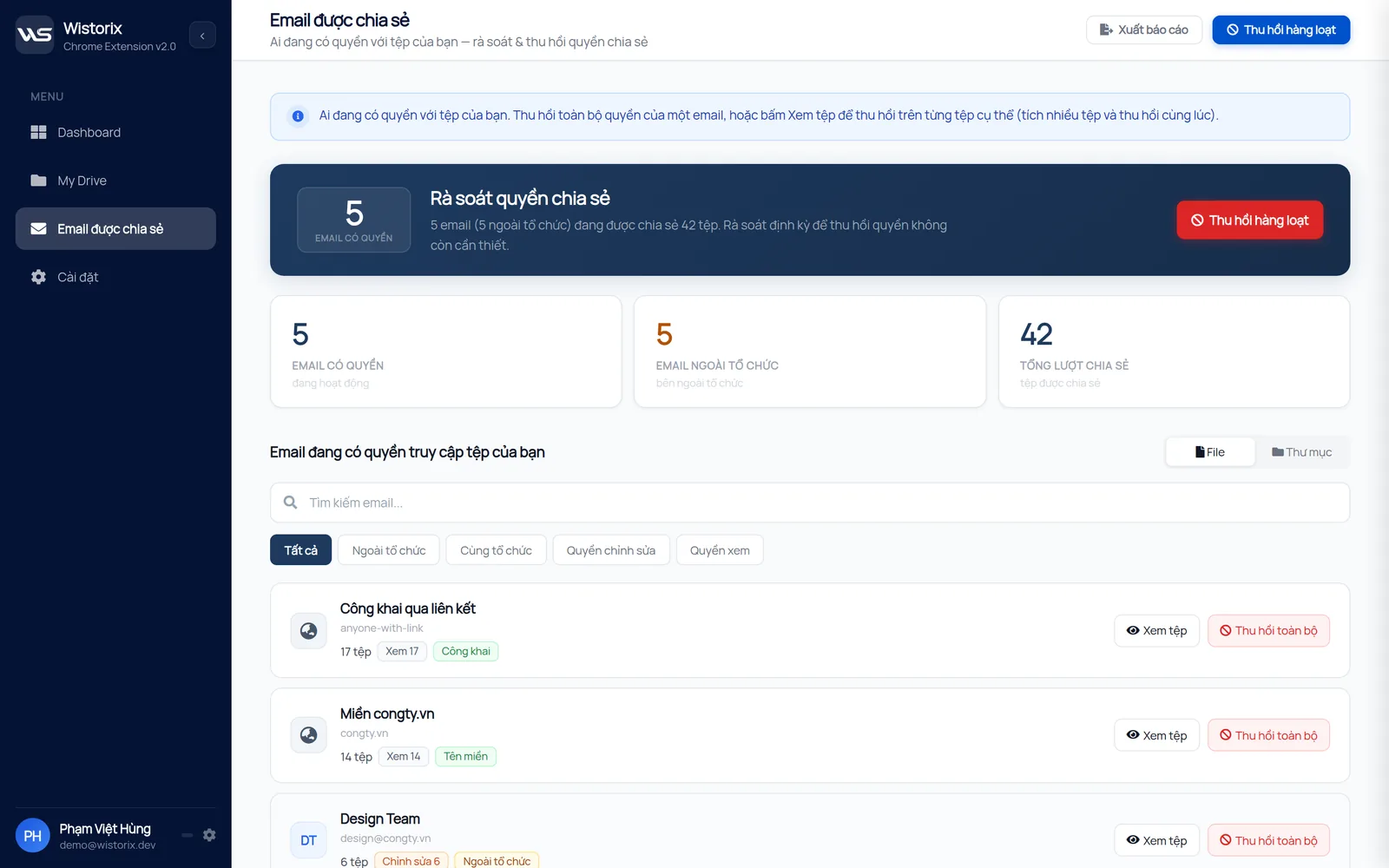
2. Revoke an old client's access in one go
When a contract ends, pick the client's email and revoke all of their access, or only some files. Removing access does not delete any file and does not notify the client. If the client needs a file again, you can share it again, and access can be granted or revoked anytime.
3. Close public links you forgot about
Freelancers often send links set to anyone with the link because it is convenient. Wistorix lists every file that is currently public so you can switch it back to Restricted, starting with quotes, contracts and a client's unreleased design files.
4. Clear duplicates and drafts to win back storage
Wistorix groups duplicate files by comparing size and the fingerprint Drive stores for each file, so renamed copies are caught too. For freelancers who work on video or design, this group is usually the fastest way to win back space. Deleted files go to the Google Drive Trash and can be restored for 30 days.
5. Transfer ownership for a client handover
Many contracts require you to hand all source files to the client at the end. Select many files in the project folder and transfer ownership to the client's email in one go, with a log to check against. Note that Google limits transfers between personal accounts and organization accounts, so agree on the method with the client first.
A 15-minute project close-out with Wistorix for freelancers
Tying your Drive review to the moment a project closes is the simplest way to stop extra access from building up. With Wistorix, the routine has five steps:
- Scan your Drive, which is always free
- Open the email of the client whose project just ended and see which files they can open
- Transfer ownership of the files the client needs to keep, if the contract requires it
- Revoke access for the client and any collaborators on everything else
- Delete the project's drafts and duplicates, then move the folder into your Archive
The full list of what you need before closing a project is in the project handover checklist. Wistorix handles the finding and the bulk actions, while the checklist makes sure you do not forget the paperwork.
Doing this on the day you send the final invoice keeps it short. The details are still fresh, you remember who worked on what, and the list of addresses to remove is only as long as one project.
Google Drive for freelancers without Workspace or an admin
Many Drive management tools only work with Google Workspace and need admin rights. Freelancers usually use a personal Gmail account, so those tools do not apply. Wistorix runs on each person's own Drive, so signing in with the Gmail account you already use is all it takes.
If you work across several accounts, such as your own Gmail and an account a client gave you, scan each account separately. Each scan only sees what that account owns or has been shared with, so results from different clients never mix.
This separation is useful for freelancers who keep client work in a client-provided account. You can review and clean up that account before the contract ends, then hand it back with nothing left open by mistake.
Scanning your Drive with Wistorix is always free, with no limit on how many times you scan. That makes it easy to run a scan at the end of every project, see what has piled up, and decide what to act on.
Wistorix for freelancers working with collaborators
Many freelancers do not work alone. They bring in a video editor, a writer or a translator for each project. Each collaborator is added to a few folders, and usually nobody remembers to remove them when the project ends. A year later, former collaborators can still open folders for clients they no longer work with.
Wistorix handles this the same way as old clients: open the collaborator's email, see which folders they can still access, and revoke what is no longer needed. If a collaborator created files in your folders, those files belong to them. Transfer ownership to your account before removing their access, so you keep the edits or translations they delivered.
One small habit makes this lighter: share with collaborators at the level of each project's subfolder, never the top folder that holds many clients. When the project ends, you only need to remove access in one place.
It also helps to keep a short note in each project folder listing who you added and when. A routine like this works for freelancers because it costs almost nothing during the project and saves real time at the end of it.
Wistorix for freelancers keeps client data safe
Before you install any tool, remember that you hold many sensitive client documents: contracts, customer data and unreleased products. You need to know exactly what a tool does with that data.
- Wistorix reads file metadata only, through the Google Drive API, and never downloads file contents
- Every action runs only after you confirm, and nothing is revoked or deleted automatically
- You can remove Wistorix's access anytime from your Google Account
Google's rules for how third-party apps may use your data are in the Google API Services User Data Policy. If a client asks how you manage their documents, a scan report from before and after you close the project is concrete evidence, and easier to present than a promise.
In short, Google Drive tools built for freelancers should tell you quickly which clients still have access to what, win back storage and make handovers clean. Install Wistorix, run a free scan and try the 15-minute routine above on a project you have already closed.
Frequently asked questions
Does Wistorix work with a personal Gmail account?
Yes. Wistorix runs on each person's own Drive and needs no Google Workspace account or admin rights.
Will a client know when I revoke their access?
No. Google Drive does not send a notification when access is removed. The client only sees that the file no longer opens.
Can I transfer ownership to a client who uses Workspace?
It depends on the account types. Google limits ownership transfers between personal accounts and organization accounts. If the Share dialog does not offer a transfer option, let the client make a copy or download the files instead.
Does Wistorix organize folders by client for me?
Wistorix helps you see and act on files client by client. You set up the folder structure yourself, following the suggestions in the client file management guide.



sharing publicly?