

Google Drive security software: see who your files are open to and close it in one pass

Google Drive security software does not replace the way Google protects its servers. Its job is to help you see what you yourself have opened up: files set to anyone with the link, outside email addresses that still have access, former clients who can still edit a project folder. Wistorix scans your whole Drive, gives it a security score from 0 to 100 and lets you revoke access in bulk. This guide explains what Wistorix checks, how to read the results and how to act on them in order of priority.
In this guide
- The real risk in Google Drive
- Five risk groups the software checks
- How the security score works
- Act on the results in order of priority
- How Wistorix protects your own data
- For freelancers and small businesses
- When to scan again
- Frequently asked questions
The real risk that Drive security software needs to find
Google protects the infrastructure behind Drive very carefully. The rest belongs to users: who gets access, in what mode, and when that access ends. Most cases of data exposure in Drive start with a perfectly normal sharing action, such as sending a client a link to a quote or opening a folder to a freelancer, and then nobody remembers to close it.
Over time, these permissions add up. A Drive that has been in use for three years can hold hundreds of public files and dozens of outside addresses with edit access. Opening each file to check is not realistic.
That is where security software for Drive helps: it reads the sharing settings of every file at once and returns a list of what needs attention. The good news is that every permission you find can be removed in seconds, and removing access deletes nothing.
Five risk groups the Wistorix security software checks
Wistorix sorts the scan results into five groups. Each group shows the number of files, how serious it is and its own action button, right on the dashboard.
1. Files public through a link
A file set to anyone with the link can be opened by whoever holds that link, even after the link has been forwarded several times. This is the most serious group, especially when the files are contracts, payroll sheets or customer data. The three link modes and how they differ are covered in the guide to Google Drive link sharing.
2. Email addresses outside your organization
Clients, freelancers and former partners keep their access after a project ends. The shared emails screen groups every permission by email address and lists addresses outside your organization separately, so you can see how many files one person can still reach.
3. Extra edit access
Many people only need to view a file but are set as editors. Editors can change or remove content and share the file onward with others. Downgrading them to viewer lowers the risk without interrupting anyone's work.
4. Files owned by people who have left
Files owned by a former employee are at risk when that person's account is deleted. Wistorix points out this group so you can transfer ownership before the handover deadline passes.
5. Orphaned files and files outside any folder
Files that sit outside every folder are often missed when people review access folder by folder. Moving them back where they belong makes every later review more complete.
You do not need to fix all five groups on the same day. The first two cover the files other people can open right now, while the last three are about keeping control over time.
How the security score in Drive security software works
Each time you scan, Wistorix calculates a security score from 0 to 100. The score starts at 100 and drops based on the five risk groups above, with each group weighted by how much of it shows up in your Drive. Public files carry more weight than files outside any folder, because the impact of an open link is much greater.
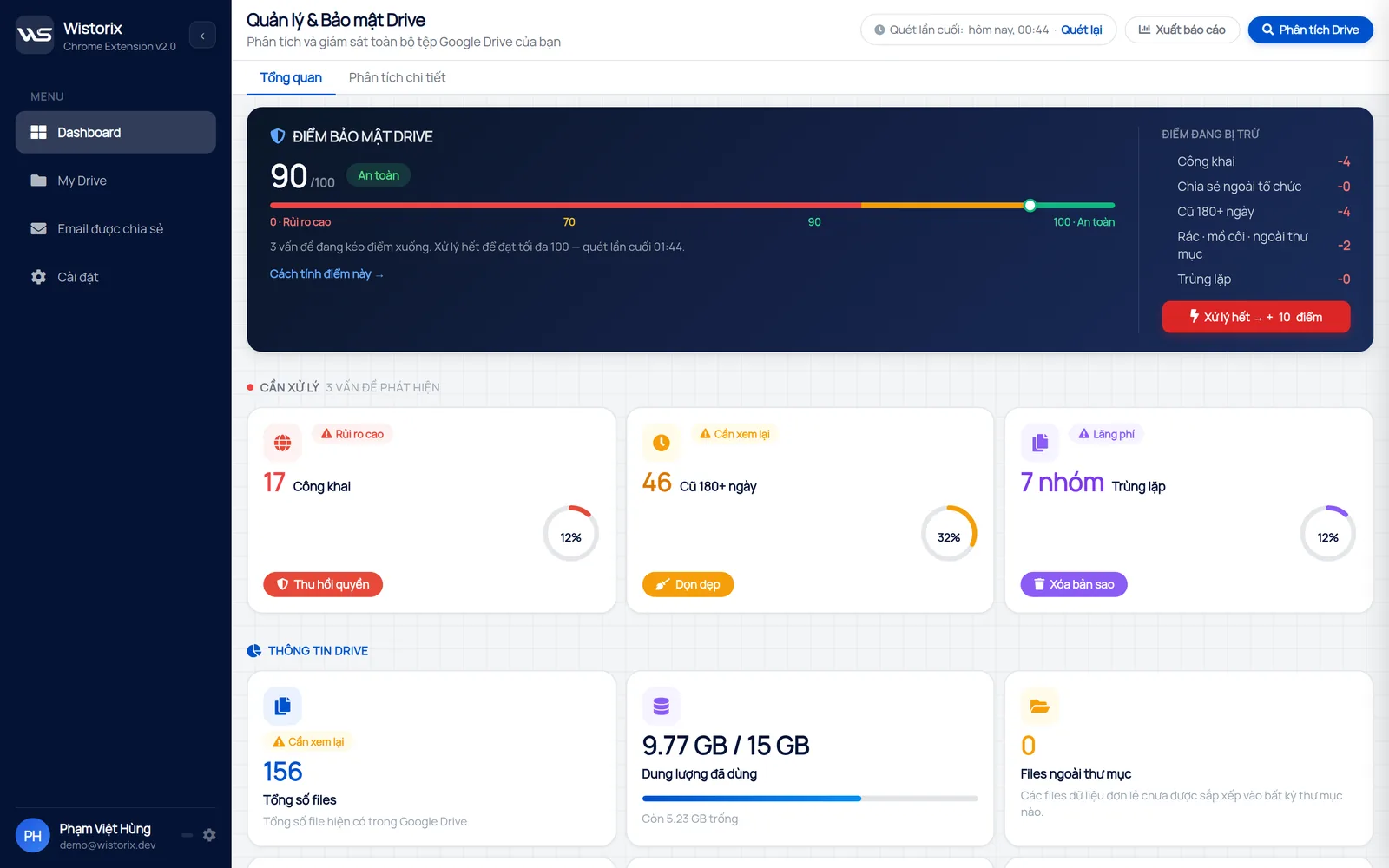
This number is not a safety certificate. It is a way to compare one scan with the next: a rising score means you have closed some risk, and a falling score means there is new sharing to review. The full method is explained in the guide to a Google Drive security audit.
Act on security software results in order of priority
The first report from any Drive security software usually has a lot of items. Do not try to fix everything in one sitting. Follow the order below, from what needs doing now to what can wait.
- Public files with sensitive information: switch them to Restricted right away
- Outside email addresses that are no longer involved: revoke all of that address's access
- Extra edit access: downgrade to viewer
- Files owned by someone about to leave: transfer ownership to the person taking over
- Files outside any folder: move them to the right folder, or deal with them if they are no longer needed
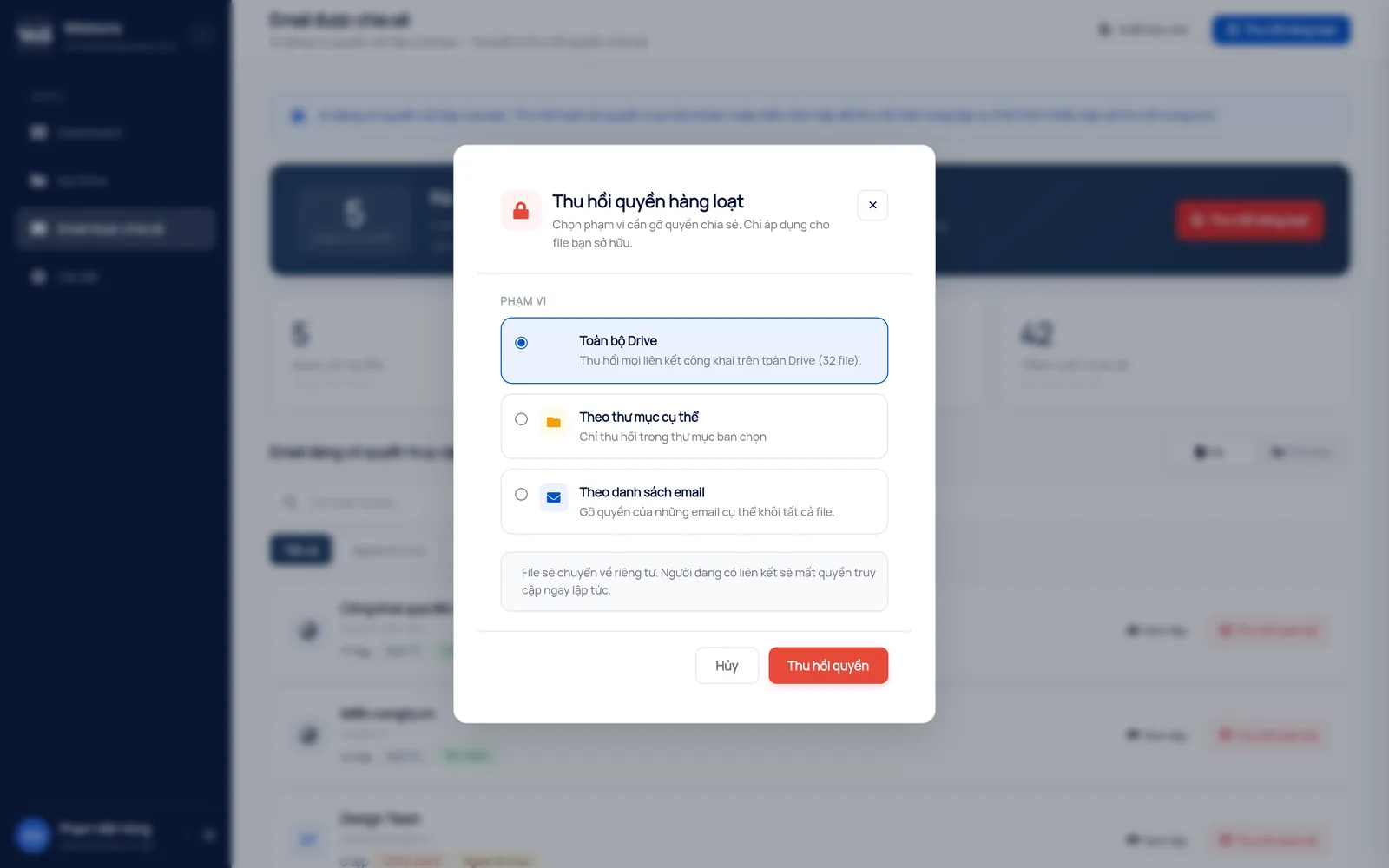
For step two, Wistorix lets you revoke access by scope: your whole Drive, one folder or a list of email addresses. Removing access does not delete files and does not notify the person removed. If you remove someone by mistake, simply share it again with that address, since access can be granted again anytime.
The full routine is in the guide on how to revoke access in Google Drive. Working through the list in this order means the most sensitive files are closed first, even if you stop halfway through.
How Wistorix protects your own data
Drive security software that reads all your documents would become a risk itself. Wistorix is built the opposite way:
- It reads only file metadata through the Google Drive API: name, size, owner, sharing settings and dates
- It never downloads file contents
- It never revokes or deletes anything on its own, and every action runs only after you confirm
- You can remove the access you gave Wistorix in your Google Account anytime
Before you install any app that connects to Drive, read the Google consent screen carefully. Google explains how to review and remove access for third-party apps in its guide to managing app connections in your Google Account.
Apply the same test to any tool you consider. Check what it asks for, what it reads and whether you stay in control of every change, and you will avoid adding a new risk while trying to remove old ones.
Google Drive security software for freelancers and small businesses
Large companies usually have a Workspace administrator and audit logs in the admin console. Freelancers, small agencies and smaller businesses do not. They use personal Gmail or a basic Workspace plan, share files with dozens of clients a year, and have nobody whose job is to review access.
For these groups, security software that runs on each person's own Drive is the practical way to stay in control. No admin rights are needed, and each person sees the files they own.
The minimum habit worth keeping is simple. Whenever a project closes, scan your Drive, filter by that client's email and revoke the access that is no longer needed. It takes a few minutes and keeps your list of people with access in line with your list of active clients.
When to run Drive security software again
Running security software on Drive is not a one-time task. Every new share changes the list of who has access. Tie your scans to a few fixed moments so it becomes a habit:
- Once a month for a Drive with a lot of client sharing
- When a project ends and its folder moves to the archive
- When someone leaves or you change freelancers
- Before you send sensitive documents to a new partner
Each scan also gives you a fresh score to compare with the last one. If the number has dropped, open the group that lost points first, because that is where the new sharing happened. If it has stayed the same, the review can be as short as a quick look at new outside addresses.
Wistorix is building scheduled automatic scans with alerts (coming soon), so you will be told when your security score drops without having to remember to scan.
In short, Google Drive security software helps you see what you have shared and close what is no longer needed. Wistorix handles the finding and scoring, scanning is always free, and the decision to revoke always stays with you.
Frequently asked questions
Does Wistorix read my contracts or payroll files?
No. Wistorix reads only the file name, size, owner and sharing settings. The contents of your files are never downloaded or stored.
Does revoking access notify the person removed?
No. Google Drive does not send a notification when you remove someone's access. They only notice when the file no longer opens for them.
Does a score of 100 mean my Drive is completely safe?
No. A score of 100 means Wistorix found no risk in the five groups it checks. It is a measure to track over time, not a certificate.
Does it work with a personal Gmail account?
Yes. Wistorix works with personal Gmail accounts and Google Workspace accounts, with no admin rights needed.



sharing publicly?