

The final part brings together the options on the Settings page, our data commitments, how to remove access and uninstall the extension, and a list of common issues with their fixes.
General settings
Click Settings (Cài đặt) in the left menu and choose the General settings (Cấu hình chung) tab.
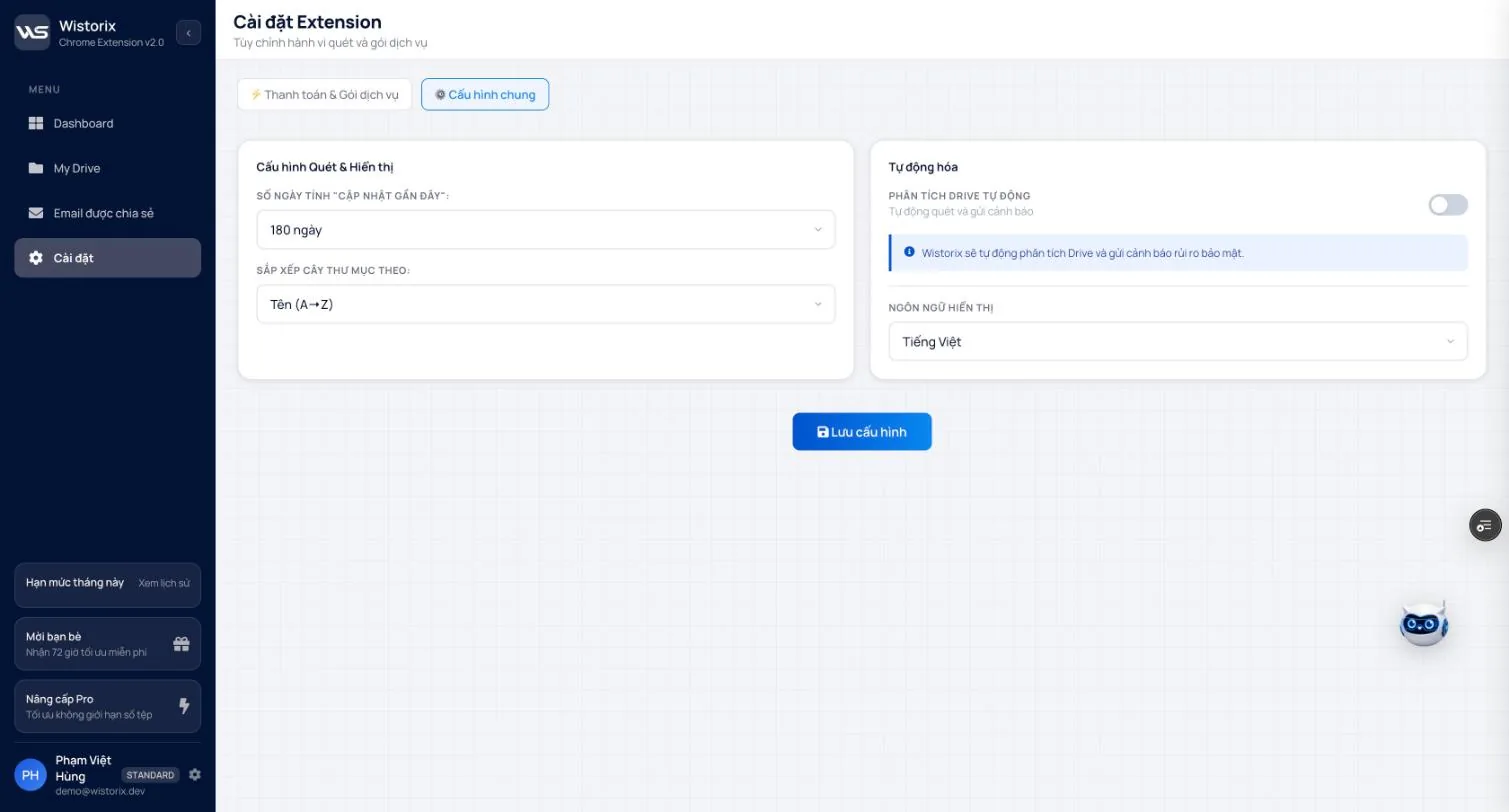
| Setting | Options | Affects |
|---|---|---|
| Days counted as "recently updated" | 30, 90, 180 (default) or 365 | The cutoff for placing files in the old files group |
| Sort folder tree by | Name (A to Z) and other orders | Folder order on the My Drive page |
| Automatic Drive analysis | On or off | Scans on a schedule and sends security risk alerts (coming soon) |
| Display language | Vietnamese | Interface language |
When you are done, click Save settings (Lưu cấu hình). A change to the day cutoff applies from the next analysis.
Privacy and data
- Wistorix reads metadata through the Google Drive API: name, type, size, owner, sharing permissions, created date and modified date. File content is not downloaded.
- Every change (stop sharing, revoke, transfer ownership, delete) runs only after you click to confirm.
- Deleted files go to the Google Drive Trash, where you can restore them within 30 days. Wistorix never permanently deletes files for you.
- Details on what data Wistorix stores and for how long are in the privacy policy.
Remove access and uninstall the extension
- Open the Third-party access page in your Google Account.
- Select Wistorix and remove all access.
- In Chrome, click the puzzle piece icon, click the three dots next to Wistorix and choose Remove from Chrome.
Removing access and uninstalling the extension does not affect your files in Drive. Changes you made earlier (for example, links you stopped sharing) stay as they are.
Common issues and fixes
Cannot sign in with a company account
Your Google Workspace admin may block extension installs or block third-party apps from accessing Drive. Ask your admin before trying anything else.
Scan results do not match the Drive you have open
You may be signed in to Wistorix with a different account from your Drive tab. Check the email in the bottom left corner of the Dashboard. Drive Widget works with the account signed in to Chrome, so open Drive with that same account.
Numbers did not update after an action
Click Rescan (Quét lại). The security score and counters are recalculated only after a new analysis.
The File preview panel says it cannot load a preview
Some file types do not support quick preview yet. The panel still shows the path, status, owner and size. Click Open in Drive (Mở trên Drive) to view the content.
Cannot transfer ownership
Check three things: whether you are the owner, whether the recipient is in the same Workspace organization or uses personal Gmail (they need to accept the invitation), and whether the file is in a shared drive. See the limits table in Part 09.
Deleted a file by mistake
Open the Trash at drive.google.com, right-click the file and choose Restore. Step-by-step guide: recover deleted files in Google Drive.
Revoked a colleague's access by mistake
Open the file in Drive, click Share and invite that email again with the same access level as before. To avoid this next time, filter for external emails before revoking instead of selecting everything.
Need more help
Send your question through the contact page, with a screenshot and the version you are using (shown in the top left corner of the Dashboard). Changes between versions are recorded in the changelog.
Frequently asked questions
Will removing Wistorix delete any files?
No. Removing access and uninstalling the extension do not affect files in your Drive.
Can I use automatic Drive analysis yet?
The switch is already in Settings, and the feature is still being finished (coming soon).
Applies to: Wistorix Dashboard v2.0 (Chrome Extension v2.0) and Drive Widget 2.1, updated Oct 9, 2026. Screenshots and button names come from this version, whose interface is currently in Vietnamese. When a new Wistorix version ships, we write a new guide and record the changes in the changelog.