

After every scan, the Overview tab gives you the full picture of your Drive. This part explains each block on the screen, how Wistorix calculates the security score and a sensible order for fixing things.
The top bar
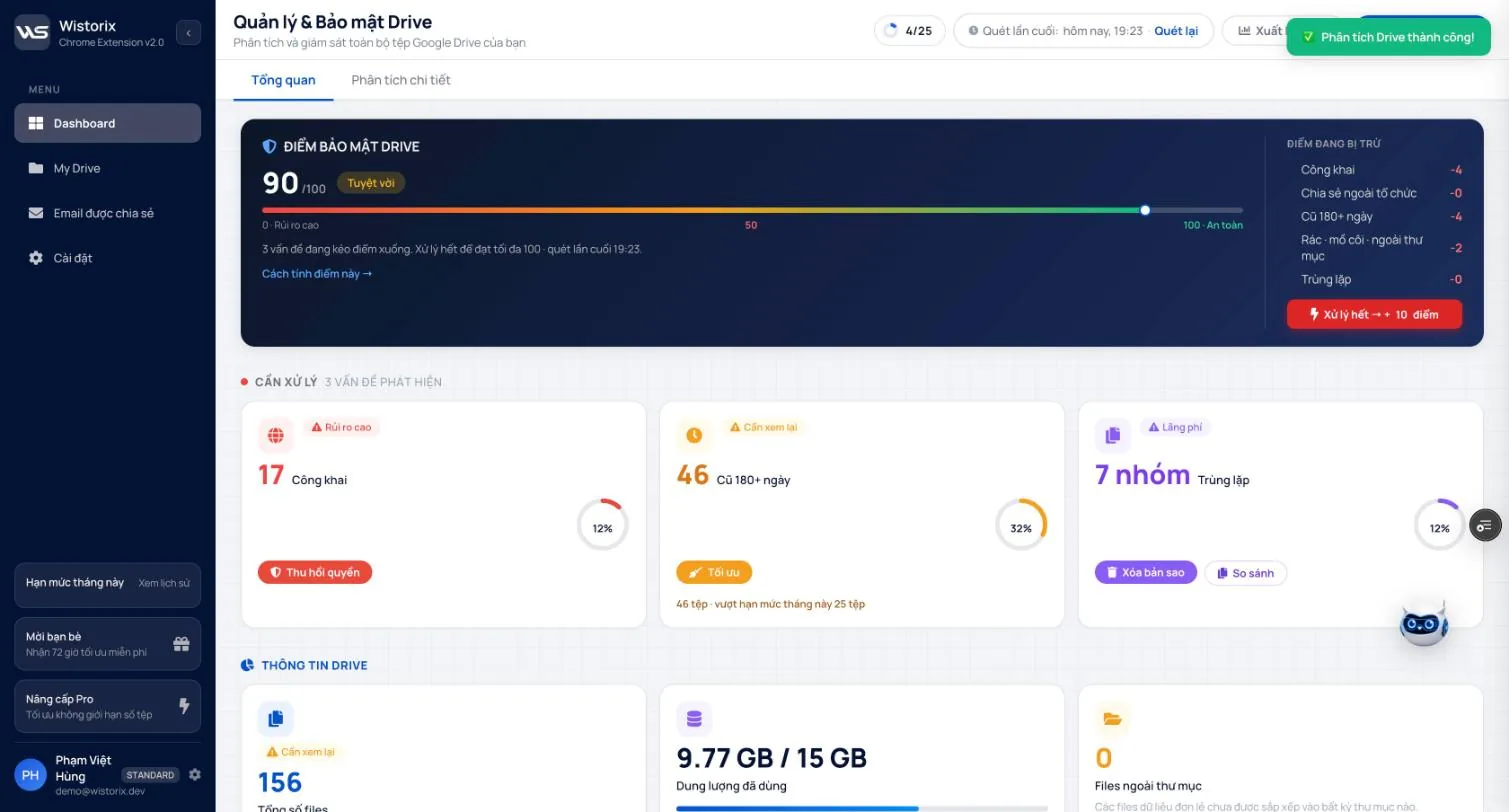
The Dashboard page is titled Drive Management & Security (Quản lý & Bảo mật Drive) and has two tabs: Overview (Tổng quan) and Detailed analysis (Phân tích chi tiết). The row of buttons at the top includes:
- The limit ring, for example 4/25: files optimized this month out of your plan's total limit.
- Last scanned (Quét lần cuối) with the scan time and a Scan again (Quét lại) link.
- Export report (Xuất báo cáo): creates a report in Google Sheets (Part 10).
- Analyze Drive (Phân tích Drive): runs the full analysis again (Part 03).
The Drive security score card
The large card at the top gives one number from 0 to 100 with a rating label, for example 90/100 Excellent (90/100 Tuyệt vời). The color bar below runs from 0 · High risk (0 · Rủi ro cao) to 100 · Safe (100 · An toàn). The description line tells you how many issues are pulling the score down.
The right-hand column, Points deducted (Điểm đang bị trừ), splits the deducted points into 5 groups: Public, Shared outside the organization, Old 180+ days, Junk · orphaned · outside folders, and Duplicates. The Fix all → +N points (Xử lý hết → +N điểm) button shows how much the score would rise if you fixed every group that is losing points.
How the score works
Click How this score works → (Cách tính điểm này →) to open the explanation table. The score starts at 100, and each risk group subtracts points using the formula Score = 100 - Σ (Weight × Severity).
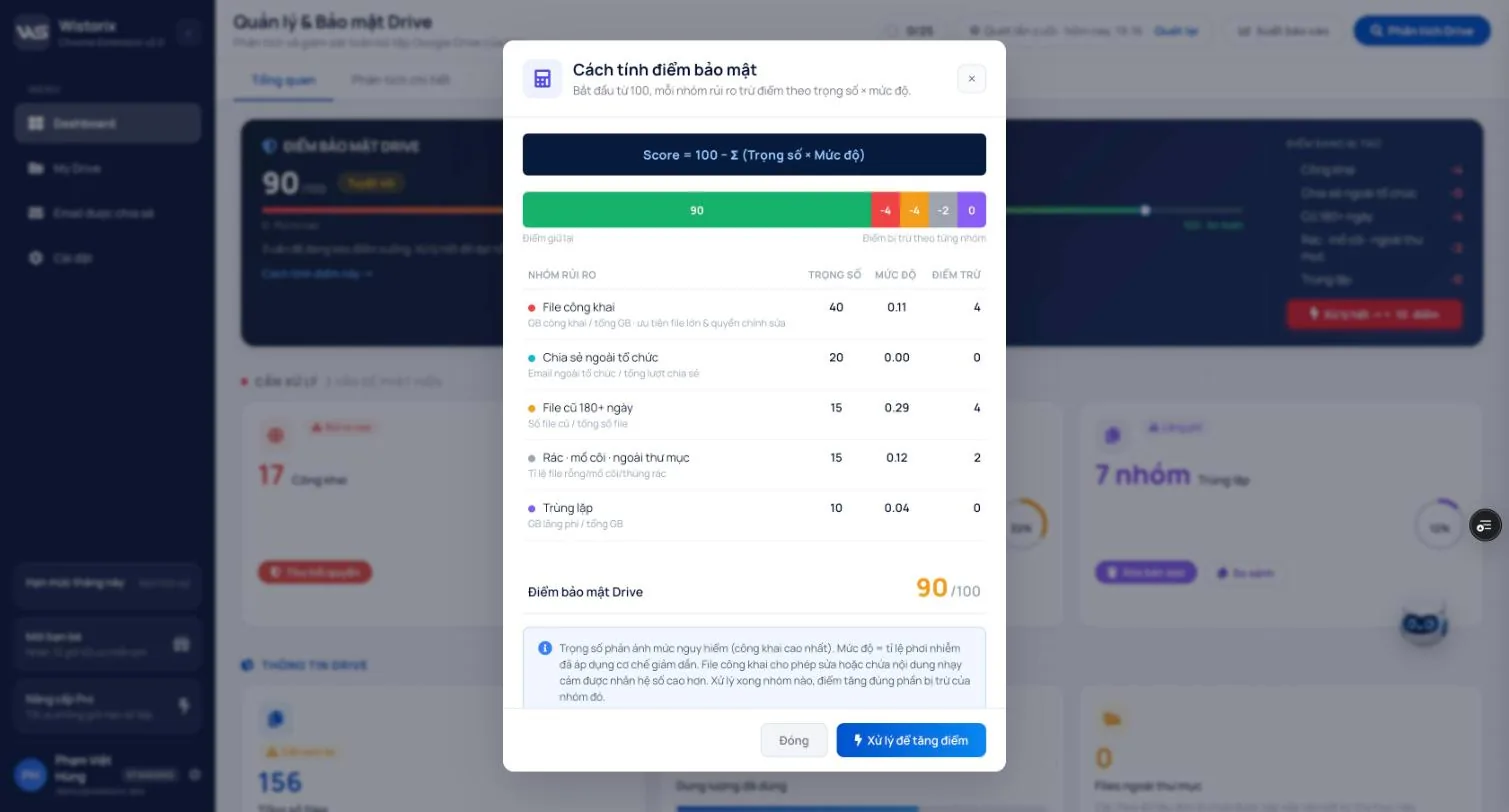
| Risk group | Weight | Severity is measured by |
|---|---|---|
| Public files | 40 | Storage used by public files out of total storage, weighted toward large files and files anyone can edit |
| Shared outside the organization | 20 | Number of external emails out of all shares |
| Files 180+ days old | 15 | Number of old files out of all files |
| Junk · orphaned · outside folders | 15 | Share of empty files, orphaned files and files in the Trash |
| Duplicates | 10 | Storage wasted by duplicate copies out of total storage |
The weights reflect how dangerous each group is: public files weigh the most. Once you fix a group, the score rises by exactly that group's deduction at the next analysis. The Fix to raise your score (Xử lý để tăng điểm) button at the bottom of the table takes you to the list of files to handle.
A score of 100 means Wistorix found no risks in the 5 groups it checks. It is a yardstick for comparing scans, not a safety certificate: the score does not assess your account password or 2-Step Verification. Read more on the Google Drive security score checker page.
The Needs attention area
The three cards below the security score, in the Needs attention (Cần xử lý) area, are the three things worth doing next. Each card has a severity label and a button that takes you straight to the fix:
| Card | Label | Button |
|---|---|---|
| Public | High risk | Revoke access (Thu hồi quyền): opens the list of public files so you can stop sharing them |
| Old 180+ days | Needs review | Optimize (Tối ưu): opens the list of files not edited in a long time |
| Duplicates (N groups) | Wasted space | Delete copies (Xóa bản sao) and Compare (So sánh): opens the most wasteful duplicate group so you can compare before deleting |
The percentage ring on each card is that group's share of your Drive. If the number of files in a group is larger than what is left of this month's limit, the card says so, for example 46 files · over this month's limit of 25 files, so you can pick the most important files first.
The Drive info and Analysis areas
- Total files (Tổng số files): the number of files Wistorix analyzed.
- Storage used (Dung lượng đã dùng): for example 9.77 GB / 15 GB, with a progress bar.
- Files outside folders (Files ngoài thư mục): standalone files not placed in any folder.
- The Analysis (Phân tích) area breaks storage down by file type and compares the storage of files you own with files others have shared with you.
What to fix first
- Close public links on sensitive files first: contracts, payroll sheets, customer data (Part 07).
- Revoke access for external emails you no longer work with (Part 08).
- Only then clean up storage: duplicate files, empty files, old files (Part 04 and Part 05).
- Click Analyze Drive to see your new score.
Frequently asked questions
What is a good security score?
There is no universal threshold. Look at which groups are losing points: if sensitive files are still public, fix them right away even if the score is high.
Why did my score drop when I did nothing?
You or someone else may have shared more files, or more files may have gone 180 days without edits. The score reflects your Drive as of the most recent analysis.
Does the score go up as soon as I fix things?
The score is recalculated at the next analysis. Click Scan again after you finish to see the new score.
Applies to: Wistorix Dashboard v2.0 (Chrome Extension v2.0) and Drive Widget 2.1, updated Oct 9, 2026. Screenshots and button names come from this version, whose interface is currently in Vietnamese. When a new Wistorix version ships, we write a new guide and record the changes in the changelog.