

The Shared emails page groups every sharing permission by recipient. This part shows you how to read the list, revoke all access for one email, revoke access on individual files and review sharing regularly.
The Shared emails page
Click Shared emails (Email được chia sẻ) in the left menu. This page answers one question: who has access to your files. Instead of opening files one by one, you review access person by person.
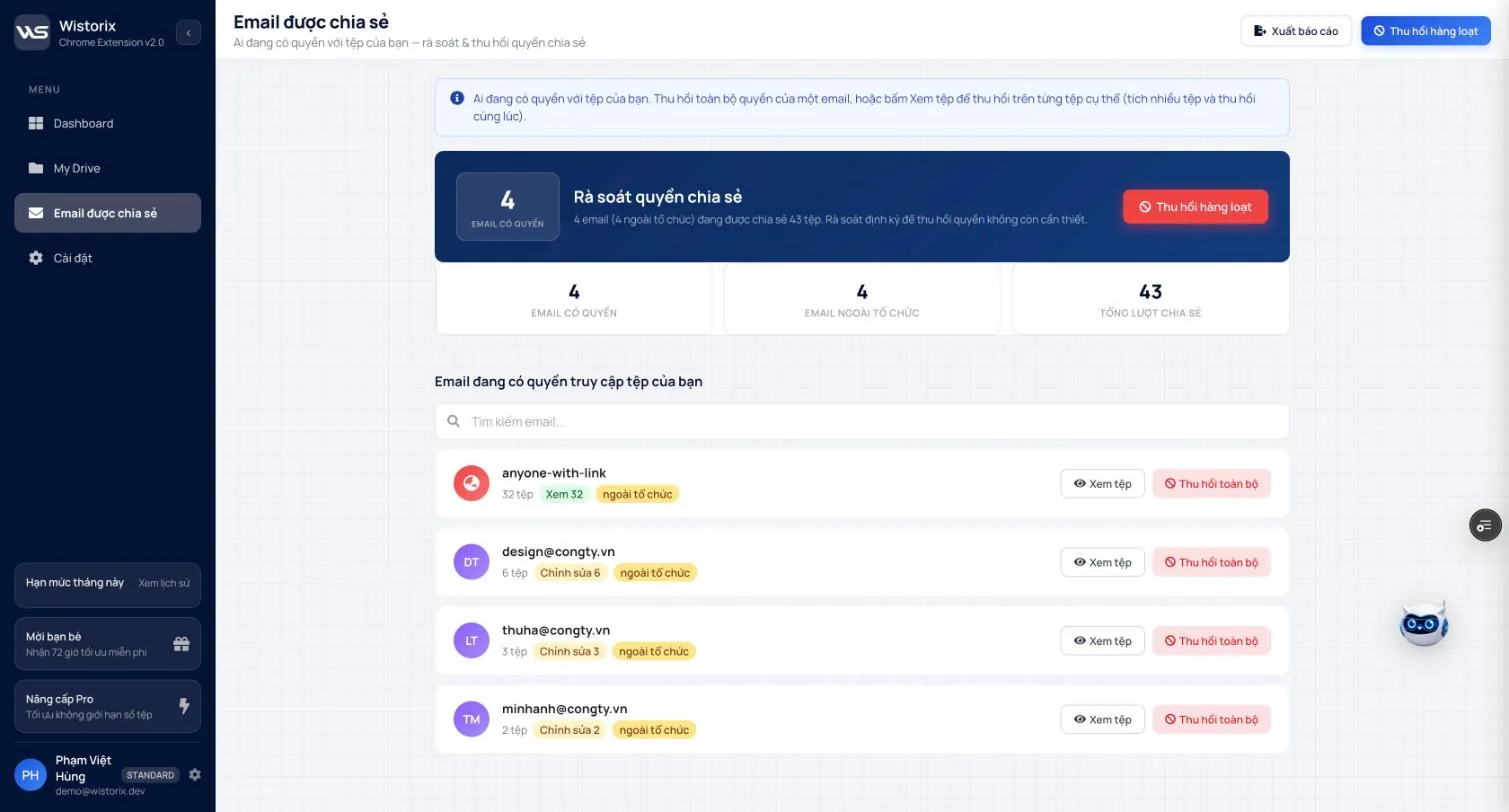
- The Sharing access review (Rà soát quyền chia sẻ) block sums it up: how many emails (and how many outside your organization) have access to how many files.
- Three counters: Emails with access (Email có quyền), External emails (Email ngoài tổ chức), Total shares (Tổng lượt chia sẻ).
- The Search emails... box jumps to a specific person.
- Top right: Export report (Xuất báo cáo) and Bulk revoke (Thu hồi hàng loạt).
Read each email row
Each row is a person or group with access, with a file count and labels:
| Label | Meaning |
|---|---|
| View N (Xem N) | Can view N files |
| Edit N (Chỉnh sửa N) | Can edit N files: change the content, and reshare if the owner allows it |
| external (ngoài tổ chức) | The email is not on the same domain as your account |
The anyone-with-link row is not a person. It is the group of files open to anyone with the link. Handle this row the same way you handle public files in Part 07.
Revoke all access for one email
Use this when a collaboration has ended: a former client, a contractor whose contract is over, an employee who has left.
- Find the email to remove.
- Click Revoke all (Thu hồi toàn bộ) at the end of the row.
- Confirm. That email is removed from every file you own in one go.
Google Drive does not notify people when their access is removed. If you are still working together, let them know first so losing access does not catch them by surprise.
Revoke access on specific files
Use this when the person still works with you but no longer needs some files, for example a client whose project is finished.
- Click View files (Xem tệp) on that email's row.
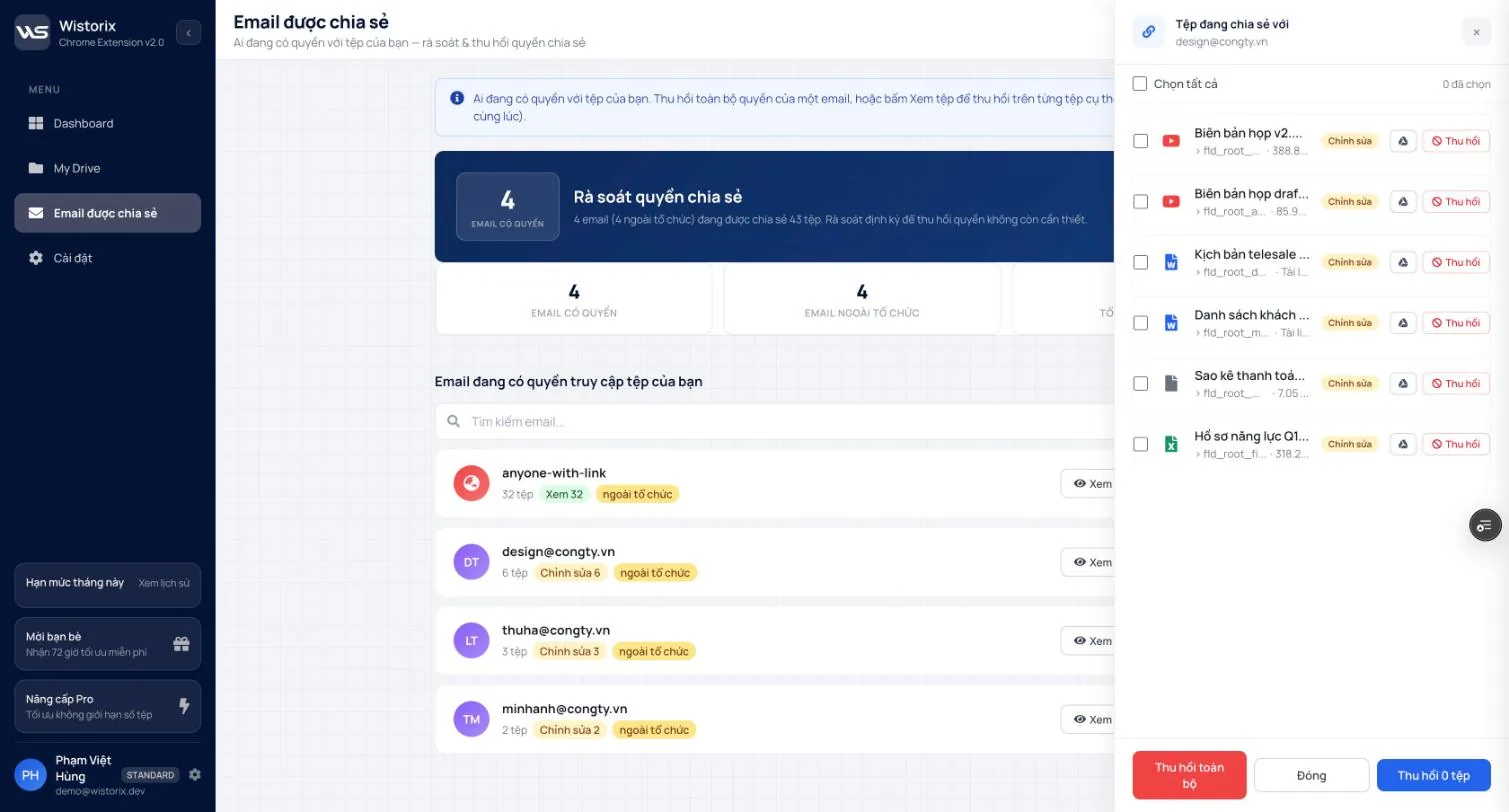
- The Files shared with (Tệp đang chia sẻ với) panel on the right lists each file, the access level (View or Edit), the path and the size.
- Click the Drive icon to open and check a file, or click Revoke (Thu hồi) on any row.
- To remove several files at once: check the files (or Select all (Chọn tất cả)), then click Revoke N files (Thu hồi N tệp) at the bottom of the panel.
Revoke by email list
When you need to remove several people at once, for example a whole group of contractors from one project season, click Bulk revoke and choose the By email list (Theo danh sách email) scope. Those emails lose access to all your files.
Run a regular review with this page
- Each month, open the Shared emails page and check whether the External emails counter has gone up.
- Compare the email list with the clients and partners you currently work with.
- Remove people who are done with Revoke all. For people still working with you, revoke only the files they no longer need.
- Click Export report to keep a record of the list before and after the review (Part 10).
When an employee leaves, add one more step: transfer ownership of the files they hold before their account is deleted. The full process is in Google Workspace offboarding and revoke access in Google Drive.
Frequently asked questions
Is someone notified when their access is revoked?
No. Google Drive does not notify people when their access is removed.
What is anyone-with-link in the list?
It is the group of files open to anyone who has the link, not a specific person.
Applies to: Wistorix Dashboard v2.0 (Chrome Extension v2.0) and Drive Widget 2.1, updated Oct 9, 2026. Screenshots and button names come from this version, whose interface is currently in Vietnamese. When a new Wistorix version ships, we write a new guide and record the changes in the changelog.